Import Comments from CSV or XLSX
When review feedback arrives in a spreadsheet or QC report, you can bring it into MediaBench without copying each note by hand. Each file creates a new topic on one asset, with comments that can include timecodes, time ranges, labels, drawings, and replies.
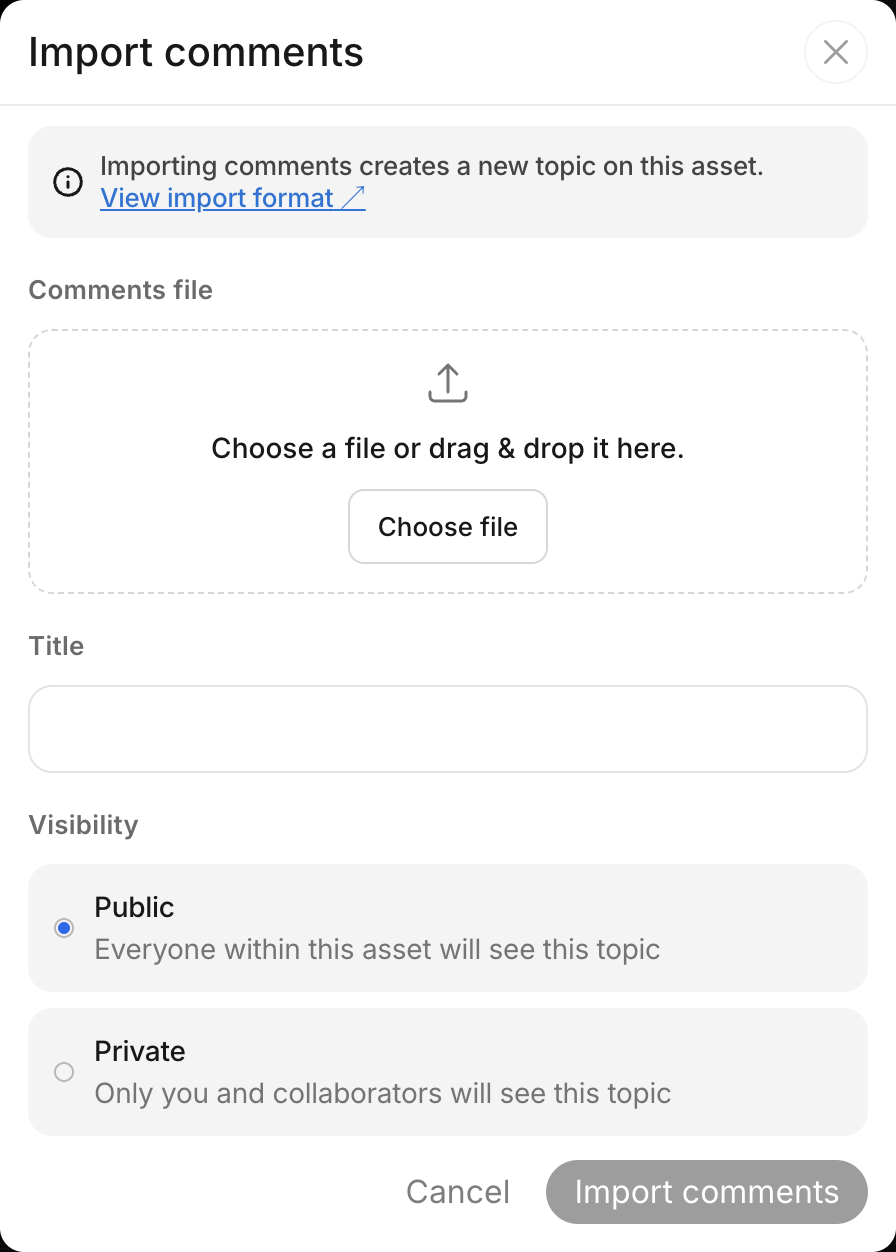
Import into a new topic
Keep imported feedback together in its own topic, and choose who can see it before importing.
- Open the asset and find the comments panel
- Open the three-dot menu (Comment actions) above the conversation and select Import comments
- Under Comments file, click Choose file or drag your
.csvor.xlsxfile into the drop zone - Enter a Title for the new topic, such as "QC report"
- Choose Public so everyone with access to the asset can see the topic, or Private and add the collaborators who should see it under Members
- Click Import comments and wait for it to finish. Large files can take several seconds
MediaBench opens the new topic and shows how many comments were imported. Imports always create a new topic; they do not add comments to an existing one.
File format
Use one row per comment or reply and the column names below.
- Use a CSV (.csv) or Excel (.xlsx) file
- Put the column names in the first row
- In Excel, put your comments on the first sheet
- Import up to 5,000 comments and replies at a time
Download example files
Both files contain the same sample review, including a time range, a drawing, and a reply.
Columns
Include at least body or figures in the header. Every comment row must contain text in body, a drawing in figures, or both. The other columns are optional.
| Column | Example | What it does |
|---|---|---|
body | Fix the subtitle | The comment text. |
timecode | 00:01:23.500 | Anchors the comment to a moment. Leave blank for a comment without a timestamp. |
end_timecode | 00:01:30 | Sets the end of a time range. Requires timecode and cannot be earlier than it. |
page | 3 | Anchors the comment to a document page. Use a positive whole number. |
label | issue | Adds a label: praise, nitpick, suggestion, issue, todo, question, thought, chore, typo, polish, quibble, or status_update. |
figures | rectangle #ff0000 10,20 30,40 | Adds drawings on the frame. See Include drawings. |
reply | yes | Makes this row a reply to the closest preceding row that is not a reply. Only one level of replies is supported. |
The columns name, email, and created_at are accepted but skipped. Other unrecognized columns are ignored, and MediaBench lists them in a warning after import.
Set timecodes
Timecodes count from the start of the asset at zero. If your source report starts at 01:00:00:00, subtract that offset before importing.
| Format | Example | How it is read |
|---|---|---|
| Seconds | 83.5 | A plain number always means seconds. |
MM:SS | 01:23 | Minutes and seconds. |
HH:MM:SS | 00:01:23 | Hours, minutes, and seconds. |
HH:MM:SS.mmm | 00:01:23.500 | Includes a fraction of a second, with any precision. |
SMPTE HH:MM:SS:FF | 00:01:23:12 | Frames, using the asset's frame rate. |
SMPTE drop-frame HH:MM:SS;FF | 00:01:23;12 | Supported only for assets at 29.97 or 59.94 fps. |
SMPTE timecodes require a known asset frame rate. A timecode beyond the asset's duration is an error. For a range, fill both timecode and end_timecode.
In XLSX, keep timecode cells as text or plain numbers. Cells formatted as dates or times are rejected.
Include drawings
Use the figures column to mark an area of the frame. Put each figure on its own line inside the cell, using this syntax:
type color x,y x,y ...
- Type:
rectangle,line, orarrow, each with exactly two points; ordrawingwith one or more points - Color: a hex value such as
#ff0000,rgb(52, 163, 219),rgba(...), or a color name such asred - Points:
x,ycoordinates as percentages of the frame, from0,0at the top left to100,100at the bottom right. Use a dot for decimals
For example, these three lines add a rectangle, an arrow, and a freehand drawing:
rectangle #ff0000 10,20 30,40
arrow rgb(52, 163, 219) 5,5 50,50
drawing red 10,10 12.5,14 15,19
In CSV, quote the whole figures cell so its commas and line breaks stay inside one cell.
Good to know
- All imported comments are attributed to you and dated at the time of import. Original author names, emails, and dates are not preserved.
- Importing sends no emails or realtime notifications.